Overview
aioRunbook (asyncio runbook) is a Python package providing an orchestration framework for automated network tests and network migrations using supporting libraries like asyncssh, netconf and snmp for interaction with the netwok elements.
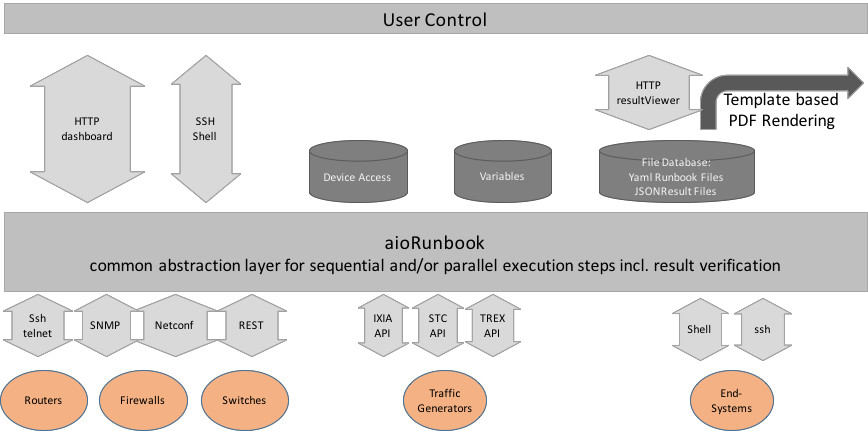
aioRunbook is designed to be controlled by either shell execution (aioRunbookScheduler) respectively aihttp web api (aioRunbookHttpServer), which utilizes the procedures from aioRunbookScheduler.
Use cases for aioRunbook are:
- automated lab tests for recurring test scenarios
- automated network migrations based on sequencial test steps with the option of a rollback functionality
aioRunbook is explicitly designed for customizable inspection of the results of scheduled test/migration steps in a sequence of test steps. Each test step interacts with just one single device. aioRunbook is designed to document the test/migration results in customizable PDF/HTML outputs.
All characteristics of the test sequence and the behaviour of the io-adapters to the network devices is controlled by a single config file.
The results of the aioRunbook steps are stored intermediately in an internal data structures, which can be exported as JSON file, for further processing like:
- rendering to PDF documents
- dispatching the results in a web app
YAML runbook as common abstraction layer
The aioRunbook configuration is defined in a main YAML file. This YAML file defines the order and characteristic of all test steps. The YAML structure is loaded in the beginning and during the execution of the test the data structure is enriched with the output of each test step. In the current design the YAML structure is open to open to add additional attributes. This concept has the flexibility that new additional attributes can be added on demand. Adapters, analyzers, or postprocessing (PDF/HTML) can utilize those attributes.
config:
  <opt. variable definitions/file reference>
  <opt. host file reference>
  steps:
    - <step-type #1>
        <step-type 1 attributes>
       commands:
          - <step-type 1 commands>
    - <step-type #n>
        <step-type n attributes>
        commands:
          - <step-type n commands>
  pdfOutput:
      <attributes for PDF output>
Device Access Config
The are two ways to define the connection parameters for device access:
- inline for each step.
- Using a host dictionary file. The first word of the step name string is used as reference. YAML host file example:
config:
  hostfiles:
  - ./testHost.yml
  steps:
    - <step-type #1>
       name: lo0_SSH headline1
       commands:
         - <step-type 1 commands>
    - <step-type #n>
       name: lo0_SSH headline2
       commands:
         - <step-type n commands>
- testHost.yml hostfile definitions:
lo0_SSH:
  device: 127.0.0.1
  method: ssh
  vendor: ubuntu
  password: testPassword
  user: testUser
Macros and Variables
aioRunbook supports a two stage concept for parameters.
- Macros, which are replaced before the steps are executed. Macros can contain Variables as placeholder.
- Variables, which are accessed during step execution. Check/Await stes can set variables.
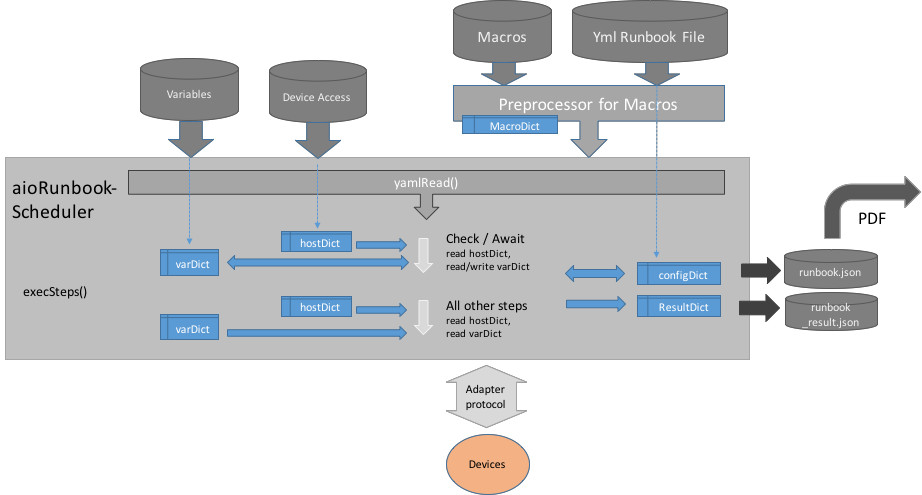
Macros
Macro substitution mechanism is using Jinja2 library with specific tags:
block_start_string = '#-MACRO-BLOCK',
block_end_string = '-#',
variable_start_string = '#-MACRO-',
variable_end_string = '-#',
example of substitution for a long list of commands
config:
  macroFiles:
    - 'testMacroFile.yml'
  steps:
    - record:
        name: a flock of echo commands
        method: local-shell
        commands: #-MACRO-ECHO5-#
with the contributing macrodefinition file in testMacroFile.yml
ECHO5:
  - echo cmdString line1
  - echo cmdString line2
  - echo cmdString line3
  - echo cmdString line4
  - echo cmdString line5
the resulting-intermediate yml file does look like:
config:
  macroFiles:
    - 'testMacroFile.yml'
  steps:
    - record:
        name: a flock of echo commands
        method: local-shell
        commands:
          - echo cmdString line1
          - echo cmdString line2
          - echo cmdString line3
          - echo cmdString line4
          - echo cmdString line5
Variables
Variable substitution mechanism is using Jinja2 library with specific tags:
variable_start_string = '.VAR.',
variable_end_string = '.',
Variables can be used in a subset for following step attributes:
- name
- command
- attributes used in check/await steps.
Jinja2 can process dict- and list-structures. aioRunbookScheduler provides two parameters ( loopIndex and stepIndex ) to iterate over variable lists, when executing steps/loops.
Var Defs Inline
config:
  vars:
    text1: "test for substituion in the name attribute"
    text2: freeze
  steps:
    - record:
        name: '.VAR.text1.'
        method: local-shell
        commands:
          - 'pip3 .VAR.text2'
Var Defs via Files
config:
  varFiles:
    - 'testParamaterFile.yml'
  steps:
    - record:
        name: '.VAR.text1.'
        method: local-shell
        commands:
          - 'pip3 .VAR.text2.'
with the contributing variable/parameter file testParamaterFile.yml:
vars:
  text1: "test for substituion in the name attribute"
  text2: freeze
Concept of Test Steps
A test step comprehends a set of interactions with a single device. During a test step one or more commands be executed on the specific device. The commands are provided with a list of strings, respectively with a list of objects for specific adaptors. In general the device parameters are referenced by the first word of the step attribute name. Optionally the the output (text, json, xml or API data) can be validated with customizable verification criteria. Based on experience is a good habit to verify the test step output if possible.
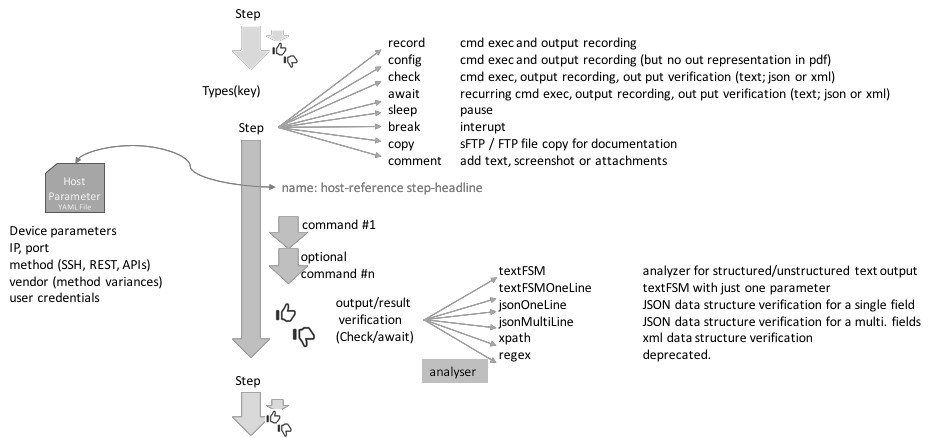
Following Step Types are implemented:
- record: executes a list (with one ore more list-elements) of commands and records the output of CLI commands
- config: similar to record, executes a list CLI commands. Was used to differentiate in PDF post processing, might be deprecated in the future.
- check: executes a list commands and checks the result of one command by an appropriate analyzer. By default the output of the last command is checked.
- await: performs periodical checks and performs an output check until the result is ‘’pass’‘, respectively the give-up-timer has expired.
- copy: sFTP file transfer to/from the network elements
- sleep: waits a configurable period of time before continuing with the next step.
- break: waits for a user input (return) before continuing with the next step
- comment: includes text-comments, text-segments, pre-recorded screenshots and file attachments. The later is a handy tool to document
- complete router configurations in the PDF output.
This an example of the aioRunbook steps:
config:
  steps:
    - record:
        name: "<DUT> - <test step summary line>"
        commands:
          - <command #1>
          - <command #n>
    - check:
        name: "<DUT> - <test step summary line>"
        commands:
          - <command #1>
          - <command #n>
        # option for CLI output verification
        textFSMOneLine: '(.*Hostname\: MX1.*) 1'
        # option for JSON output verification
        jsonOneLine: '[some] == "data"'
    - await:
        name: "<DUT> - <test step summary line>"
        give-up-timer: 10
        commands:
          - <command #1>
          - <command #n>
        # option for CLI output verification
        textFSMOneLine: '(.*Hostname\: MX1.*) 1'
        # option for JSON output verification
        jsonOneLine: '[some] == "data"'
Step Scheduler
Two modes of scheduling for test steps are supported:
- foreground / blocking mode: the scheduler waits until the test-step is finshed, before the next step is started.
- background / non blocking mode: the scheduler starts the test-step in the background and continues to the nest test-step.
- Once the test step is finished in the background, then the results are collected.
It is possible to loop the list of test steps by configuring a loop counter.:
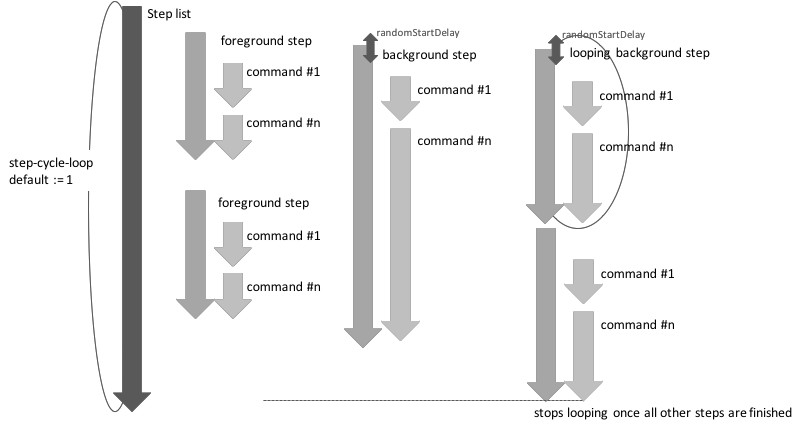
This example lists the config options for aioRunbook step concurrency:
config:
  loops: <n>  #optional default := 1
  steps:
    - record:
        name: "<DUT> - <foreground test step summary line>"
        commands:
          - <command #1>
    - record:
        name: "<DUT> - <background test step summary line>"
        startInBackground: true  #optional default := false
        randomStartDelay: 1  #optional default := 0 (seconds)
        commands:
          - <command #1>
step Types
sleep
Useful to pause for a pause-period the execution before moving to the next step
config:
  steps:
    - sleep:
        name: sleep seconds specified in the seconds attribute
        seconds: 5
    - sleep:
        name: sleep of 5 seconds specified in the name attribute
Attributes:
- name(str): Arbitrary identifier for this step. can include the pause period
- as integer value. Mandatory
- seconds(int/float): Specifies the value in seconds to be paused. Optionally in case
- that the pause period is provided with the name attribute, otherwise mandatory.
break
Useful to pause the execution and wait for operator confirmation before moving to the next step
config:
  steps:
    - break:
        name: hit return to proceed
    - break:
        name: break for status analyses
        display: hit return to proceed
Attributes:
- name(str): Arbitrary identifier for this step. Mandatory
- display(str): Specifies the value in seconds to be paused. Optionally in case
- that the pause period is provided with the name attribute, otherwise mandatory.
- optionally any arbitrary attribute which is processed by output rendering
comment
Useful to attach local config files respective local images to PDF output. Include additional information to the output, which then can be post-processed by the rendering engine. Remote config files must be copied first via copy to the local machine.
config:
  steps:
  - comment:
      name: comment test - inlude log file as text
      description : |
        description for comment, the box below is the recorded log.
      inludeTextFileInListingBox: wiki-static-logs/uname.log
                                  # parent search directory is TA/results_IPLS
      result: pass    #pass/fail/skip
  - comment:
      name: comment test - inlude log file as attachment
      description : |
        description for comment, attached the recorded log.
      attachFile: ../../wiki-static-logs/uname.log
      result: pass    #pass/fail/skip
  - comment:
      name: comment test
      description : |
        description for comment, smiley as pdf
      inludeImageFromFile: wiki-static-logs/smiley
                           # parent search directory is ../../ which is TA/results_IPLS
                           # image must be present in .pdf or .eps format
      result: pass    #pass/fail/skip
Warning
the relative directory to the PDF output directory. please specify absolute path.
record
executes a list (with one ore more list-elements) of CLI commands and records the output of CLI commands
config:
  steps:
    - record:
        name: unixDUT - print a test message
        commands:
          - echo "Hello World"
Attributes:
- name(str): Arbitrary identifier for this step. Mandatory
- startInBackground(boolean): Defines whether the test-step is scheduled in the foreground or background. Optional, Default is false
- randomStartDelay(int;float): Provides the functionality to delay the start of the step with a variable timer. the theoretical
- minimal delay is 0, the theoretical maximum delay is value provided with this attribute. Only applicable for background steps.
- Optionally any arbitrary attribute which is processed by adaptors, analyzers or rendering. Please refer to the sections below
config
function is similar to record, only that the PDF template engine processed the out of the config stepType differently from the record stepType. Might be deprecated in the future.
Note
not advised to be used - please use instead:
- check step if the result of config change can be verified. (e.g. commit result, REST response code)
- record step (with attributes to control the insertion in the PDF document)
check
Command interaction with the DUT is similar to record, in addition the output from the DUT is analyzed with an analyzer function.
config:
  steps:
    - check:
        name: unixDUT - print a test message
        commands:
          - echo "Hello World"
        textFSMOneLine: '(.*Hello World.*) 1'
Attributes:
- name(str): Arbitrary identifier for this step. Mandatory
- startInBackground(boolean): Defines whether the test-step is scheduled in the foreground or background. Optional, Default is false
- randomStartDelay(int;float): Provides the functionality to delay the start of the step with a variable timer. the theoretical
- minimal delay is 0, the theoretical maximum delay is value provided with this attribute. Only applicable for background steps.
- checkMethod(str): Specifies the analyzer Optional. Supported options are:
- textfsm (default)
- exact
- xpath
- json
- regex (not recommended to use)
- checkCommandOffsetFromLastCommand(int) Used for checking intermediate commands for a list of multiple commands. Optional. Default is the last command
- Optionally any arbitrary attribute which is processed by adaptors, analyzers or rendering. Please refer to the sections below
await
similar to check, however in cases of negative analyzer responses the command series is repetitive executed until either the analyzer response is positive respectively the give-up-timer period is exceeded.
config:
  steps:
    - await:
        name: "DUT - await that BGP neighbor is established"
        give-up-timer: 40
        command-repetition-timer: 5
        commands:
          - "show bgp neighbor 10.1.1.1"
        textFSM: |
          Value Required P0 ( *Type\: External *State\: Established.*)

          Start
            ^${P0} -> Record

          End
        checkResultCount: 1
Attributes:
- name(str): Arbitrary identifier for this step. Mandatory
- startInBackground(boolean): Defines whether the test-step is scheduled in the foreground or background. Optional, Default is false
- randomStartDelay(int;float): Provides the functionality to delay the start of the step with a variable timer. the theoretical
- minimal delay is 0, the theoretical maximum delay is value provided with this attribute. Only applicable for background steps.
- checkCommandOffsetFromLastCommand(int) Used for checking intermediate commands for a list of multiple commands. Optional. Default is the last command
- give-up-timer (int): Specifies the period in which a positive response is tried.
- command-repetition-timer (int): Sets the frequency interval in seconds for command repetition. Optional. Default is 1 second.
- Optionally any arbitrary attribute which is processed by adaptors, analyzers or rendering. Please refer to the sections below
copy
currently sftp is supported.
config:
  steps:
    - copy:
        name: unixDUT - copy a file from the device
        direction: get
        remote: /tmp/tmpCopyFile
    - copy:
        name: unixDUT - copy a file to the device
        direction: put
        local: tmpCopyFile
Attributes:
- please refer for sftp login commands to the ssh adapter.
- direction (str): Direction of the filetransfer. Mandatory, “put” or “get” are the options.
- local (str): defines the local filename. Mandatory for get direction.
- remote (str): defines the remote filename. Mandatory for put direction.
Warning
The target file name is currently identical with the source filename. There is the option in asyncssh to store the file under a different name. Might be added in the future.
Warning
currently only sFTP is supported. ftp might be added in the future.
Adapters
following adapters are supported to connect to network devices:
- aioLocalShellConnect - provides access to the local shell
- aioSshConnect - an SSH adapter for router interactions
- aioTelnetConnect - a telnet adapter for router interactions
- aioRtbRestConnect - a REST adaptor for rtbrick devices
- aioSnmpConnect - a SNMPv2c and SMPv3 adaptor, based on pysnmp
Note
following adapters will be added in the future:
- netconfConnect
- snmpTrapReceiver
aioLocalShellConnect
adapter used for executing commands in a local shell. Please note that each command is executed in its own shell. Please use the concatenation with semicolon to execute all sub-commands in one single shell.
example
- YAML config file step definitions:
config:
  hostfiles:
    - ./testHosts.yml
  steps:
    - record:
        name: mySystem - ls of . and ls of ..
        commands:
          - "ls"
          - "cd ..; ls"
- hostfile definitions:
mySystem: {'device': 'local-shell','vendor':'local-shell', 'method':'local-shell' }
- YAML dump of an enriched stepDict output dict (last step after execution)
    - commandCount: 1
      commandOrig: ls
      device: local-shell
      elapsed: '0:00:00.018422'
      elapsedRaw: 0.018422
      endTS: '2018-01-21 22:53:19.512726'
      loopCounter: 1
      output: 'host.yml
        myLog.log
        test.yml
        test_aioRtBRickRest_restDummy.py
        test_aioRunbook.py
        test_aioSftp_Juniper.py
        test_aioSshConnect.py
        test_aioSshConnect_Cisco.py
        test_aioSshConnect_Juniper.py
        test_aioSshConnect_Ubuntu.py
        test_aioTelnetConnect_Cisco.py
        test_aioTelnetConnect_Juniper.py'
      pass: true
      skip: false
      startTS: '2018-01-21 22:53:19.494304'
      stepCount: 0
      stepType: record
    - commandCount: 2
      commandOrig: cd ..; ls
      device: local-shell
      elapsed: '0:00:00.017580'
      elapsedRaw: 0.01758
      endTS: '2018-01-21 22:53:19.530385'
      loopCounter: 1
      output: '__pycache__
        adaptors
        aioRunbook.py
        analyzers
        archive
        devTests
        docs
        fileTransfer.py
        myLog.log
        runbook.py
        runbooks
        testHosts.yml
        tests
        tools'
      pass: true
      skip: false
      startTS: '2018-01-21 22:53:19.512805'
      stepCount: 0
      stepType: record
    stepCounter: 0
    vendor: local-shell
valueMatrix:
aioSshConnect
adapter used for ssh device access:
- a wrapper around asyncssh .
example Junos
- YAML config file step definitions:
config:
  hostfiles:
    - ./testHosts.yml
  steps:
    - check:
        name: "myMX - show version"
        commands:
          - config
          - set system host-name myMX
          - commit and-quit
        textFSMOneLine: '(.*commit complete.*) 1'
    - check:
        name: "myMX - show version"
        commands:
          - show version | match Hostname
        textFSMOneLine: '(.*Hostname\: myMX.*) 1'
- hostfile definitions:
myMX: {'device': '192.168.56.11','method':'ssh','vendor':'juniper','password': 'admin1', 'user': 'admin'}
- YAML dump of an enriched stepDict output dict (last step after execution)
checkResultCount: 1
commands:
- show version | match Hostname
device: 192.168.56.11
hostname: myMX
method: ssh
name: myMX - show version
output:
- checkResult:
  - - 'Hostname: myMX'
  commandCount: 1
  commandOrig: show version | match Hostname
  device: 192.168.56.11
  elapsed: '0:00:00.012352'
  elapsedRaw: 0.012352
  endTS: '2017-12-31 08:04:24.343667'
  loopCounter: 1
  output: '

    Hostname: myMX

    '
  pass: true
  skip: false
  startTS: '2017-12-31 08:04:24.331315'
  stepCount: 1
  stepType: check
password: admin1
textFSM: "Value Required P0 (.*Hostname\\: myMX.*)\n\nStart\n  ^${P0} -> Record\n\n\
  End"
textFSMOneLine: '(.*Hostname\: myMX.*) 1'
user: admin
vendor: juniper
example IOS-XR
- YAML config file step definitions:
- check:
    name: "myXR - set hostname"
    commands:
      - conf
      - hostname myXR
      - commit
      - exit
    textFSMOneLine: '(.*error.*) 0'
- check:
    name: "myXR - verify hostname setting"
    commands:
      - show running | incl hostname
    textFSMOneLine: '(.*myXR.*) 1'
- hostfile definitions:
myXR: {'device': '192.168.56.31','method':'ssh','vendor':'cisco','password': 'cisco', 'user': 'cisco'}
- YAML dump of an enriched stepDict output dict (last step after execution)
checkResultCount: 1
commands:
- show running | incl hostname
device: 192.168.56.31
hostname: myXR
method: ssh
name: myXR - verify hostname setting
output:
- checkResult:
  - - hostname myXR
  commandCount: 1
  commandOrig: show running | incl hostname
  device: 192.168.56.31
  elapsed: '0:00:00.160972'
  elapsedRaw: 0.160972
  endTS: '2017-12-31 07:40:23.680625'
  loopCounter: 1
  output: "\rSun Dec 31 07:40:22.514 UTC\nBuilding configuration...\nhostname myXR"
  pass: true
  skip: false
  startTS: '2017-12-31 07:40:23.519653'
  stepCount: 1
  stepType: check
password: cisco
textFSM: "Value Required P0 (.*myXR.*)\n\nStart\n  ^${P0} -> Record\n\nEnd"
textFSMOneLine: (.*myXR.*) 1
user: cisco
vendor: cisco
aioTelnetConnect
adapter used for telnet device access. ported from telnetlib to asyncio
shall behave similar to the ssh adapter
aioRtbRestConnect
This adapter controls the interactions with rtbrick routers.
example rtbrick
- YAML config file step definitions:
config:
  hostfiles:
    - ./testHosts.yml
  steps:
    - record:
        name: "myRtBrickDevice - just a request"
        commands:
          - 'set global.interface.logical.config interface_name lo-0/0/0/0/10 interface_description VRF1-lo-10 instance VRF1'
        includeRequestInOutput: true
myRtBrickDevice: {'device': '127.0.0.1','port' : 8080, 'method':'rest','vendor':'rtbrick'}
- YAML dump of an enriched stepDict output dict (last step after execution). Please note that the output string is itself an YaML formatted string, which is cluttered in this dump. However this string can be parsed as YAML string in the post processing.
commands:
- set global.interface.logical.config interface_name lo-0/0/0/0/10 interface_description
  VRF1-lo-10 instance VRF1
device: 127.0.0.1
hostname: restDummy
includeRequestInOutput: true
jsonOneLine: '["returnCode"] == 200'
method: rest
name: restDummy - set logical loopback for VRF1
output:
- commandCount: 1
  commandOrig: set global.interface.logical.config interface_name lo-0/0/0/0/10 interface_description
    VRF1-lo-10 instance VRF1
  device: 127.0.0.1
  elapsed: '0:00:00.008215'
  elapsedRaw: 0.008215
  endTS: '2017-12-31 08:30:13.775593'
  loopCounter: 1
  output: "header:\n  BDS-Objects-added: '1'\n  Content-Length: '2'\n  Content-Type:\
    \ application/json; charset=utf-8\n  Date: Sun, 31 Dec 2017 07:30:13 GMT\n  Server:\
    \ Python/3.5 aiohttp/2.3.6\njson: {}\nrequest:\n  command: POST\n  json:\n   \
    \ objects:\n    - attribute:\n        instance: VRF1\n        interface_description:\
    \ VRF1-lo-10\n        interface_name: lo-0/0/0/0/10\n    table:\n      table_name:\
    \ global.interface.logical.config\n  url: http://127.0.0.1:8080/bds/object/add\n\
    returnCode: 200\n"
  pass: true
  skip: false
  startTS: '2017-12-31 08:30:13.767378'
  stepCount: 0
  stepType: record
port: 8080
vendor: rtbrick
aioSnmpConnect
an adAdapter to send SNMPv2c and SNMPv3 requests. based on underlying pysnmp framework.
example snmp v2
- YAML config file step definitions:
config:
  hostfiles:
    - ./host.yml
  steps:
    - record:
        name: "DUT - get SNMP OID "
        startInBackground: true
        blockingAdapter: true
        commands:
          - get iso.3.6.1.2.1.1.1.0
"DUT: {'device': '192.168.56.11','port':'161','method':'snmp','community': 'COMMUNITY1', 'version': 'v2c'}"
aioNetconfConnect
an adAdapter to send netconf requests via the ncclient framework
example Junos
- YAML config file step definitions:
config:
  hostfiles:
    - ./host.yml
  steps:
    - record:
        name: "DUT - this is a test for get_netconf config"
        commands:
          - get_config running
          - get_chassis_inventory
"DUT: {'device': '192.168.56.11','port':'830','method':'netconf', 'ncclientVendor': 'junos', 'password': 'admin1', 'user': 'admin'}"
Analyzers
following analyzers are supported to connect to network devices:
- textFsmCheck for checking CLI output in text format.
- jsonCheck for checking data in YAML or JSON notion.
Warning
following analyzers need to be ported:
- xpathCheck
textFsmCheck
textFsmCheck is a wrapper for TextFSM. TextFSM is a Python module which implements a template based state machine for parsing semi-formatted text. Originally developed to allow programmatic access to information returned from the command line interface (CLI) of networking devices. The TextFSM engine takes two inputs - a template file (which provided with the stepDict), and text input (which is provided from command responses from CLI-commands from of a adaptor towards a device) and returns a list of records that contains the data parsed from the text. TextFSM was developed internally at Google and released on github under the Apache 2.0 licence for the benefit of the wider community.
Once the textFSM returns the list of records (matrix), this matrix can be analysed with following algorithms:
- checkResultCount <int>: Just compares the provided number with the number of textFSM records
- evalResultCount <string>: Evaluates the provided python formula with the number of
- textFSM records, which is represented as list [] in the python formula. Useful if the exact number of matches can vary: e.g “[] < 0”
- evalListElement <string>: Used for textFSM, json and xpath. Evaluates the actually
- value of matched field in with python expression. The field is represented as list element in the python formula. Useful for numeric range evaluations: e.g. “500 <= [0]”
textFSMOneLine ex.
The textFSMOneLine provides the means to specify a textFSM template in a single line. during execution of the verification, the contents of a single line are exploded to the textFSM template. textFSMOneLine has the restriction that is supports only on parameter.
- example YAML config file step definitions:
config:
  steps:
    - check:
            name: "DUT1 - check the ISIS Metric of 100 is applied on interface to DUT2"
            commands:
              - show isis interface xe-1/0/0.0 extensive
            textFSMOneLine: "(.*Metric\\: 100) 1"
- extracted code segment, which does the exploding.
if "textFSMOneLine" in stepDict.keys():
    parameterString = " ".join(stepDict["textFSMOneLine"].split(" ")[:-1])
    stepDict["textFSM"] = "Value Required P0 {}\n\nStart\n".format(parameterString) + "  ^${P0} -> Record\n\nEnd"
    stepDict["checkResultCount"] = int((stepDict["textFSMOneLine"].split(" ")[-1]))
Note
it might be useful to modify the the code, so that also evalResultCount and evalListElement are suported
simple textFSM ex.
The textFSM multiline string attribute represents the complete textFSM template.
- example YAML config file definition of a simple textFSM template:
config:
  steps:
    - check:
        name: "DUT1 - check that route 10.19.36.0 with RT 65535:1136 is sent to DUT2"
        commands:
          - "show route advertising-protocol bgp 10.20.2.1 community target:65535:1136 rd-prefix 10.20.2.2:1136:10.19.36.0/24"
        textFSM: |
          Value Required P0 (.*10.20.2.2:1136\:10.19.36.0/24.*)

          Start
            ^${P0} -> Record

          End
        checkResultCount: 1
complex textFSM ex.
The textFSM multiline string attribute represents the complete textFSM template.
- example YAML config file definition of a more complex textFSM template:
config:
  steps:
    - check:
        name: "DUT1 - check that show-system-switch shows correct state"
        description: |
          The command show-status-switch must return following lines:\\
          Graceful switchover: On\\
          Configuration database: Ready\\
          Kernel database: Ready\\
          Switchover Status: Ready\\
        commands:
          - show system switch
        textFSM: |
          Value P0 (.*Graceful switchover\: On.*)
          Value P1 (.*Configuration database\: Ready.*)
          Value P2 (.*Kernel database\: (Ready|Synchronizing).*)
          Value P3 (.*(Switchover Status|Peer state)\: (Ready|Steady State).*)

          Start
            ^${P0} -> Record
            ^${P1} -> Record
            ^${P2} -> Record
            ^${P3} -> Record

          End
        checkResultCount: 4
jsonCheck
verification method for returned data structures (e.g. REST response, Juniper JSON formatted CLI response)
- jsonOneLine string: provides a comprehensive method to validate a single data element
- in the json datatructure. Currently the == operator is supported. Additional operators could be added on demand.
- jsonMultiLine list of strings provides a comprehensive method to validate multiple
- data elements in the json datatructure. All valiations are must succeed. If a single validations fails, the check test is marked as failed.
- checkMethod json: provides a disaggregated method.
- jsonString provides the json validation string in python syntax: e.g. [“software-information”][0][“junos-version”][0][“data”]
- evalValue & evaluates the value of the jsonmatch in an python expression. Useful for string verifications: “{} == ‘16.1R4-S4.3’”
jsonOneLine ex.
- example YAML config file definition of a jsonOneLine statement:
config:
  steps:
    - check:
        name: "restDummy - set logical loopback for VRF1"
        commands:
          - 'set global.interface.logical.config interface_name lo-0/0/0/0/10 interface_description VRF1-lo-10 instance VRF1'
        jsonOneLine: '["returnCode"] == 200'
jsonMultiLine ex.
- example YAML config file definition of a jsonMultiLine statement:
config:
  steps:
    - check:
        name: "restDummy - set logical loopback for VRF1"
        commands:
          - 'get VRF1.bgp.rib-in.ipv6.unicast.2003:4:f022:ff00::1.2003:4:f022:ff00::3 prefix6 2049:10:6::/48 recv_path_id 0'
        jsonMultiLine:
          -  '["returnCode"] == 200'
          -  '['json']['objects'][0]['attribute']['community'] == ["3320:1276", "3320:2010", "3320:9010", "65535:65284"]'
          -  '['json']['objects'][0]['attribute']["as_path"] == [3320, 4910, 4910, 4910, 64512, 4910, 65535]'
jsonString ex.
- older specification for json checks, might be deprecated in the future:
config:
  steps:
    - check:
        name: "restDummy - set logical loopback for VRF1"
        commands:
          - 'set global.interface.logical.config interface_name lo-0/0/0/0/10 interface_description VRF1-lo-10 instance VRF1'
        checkMethod: json
        jsonString: '["returnCode"]'
        evalListElement: '[0] == 200'
diffCheck
This analyzer compares the current output with previously recorded outputs(snapshots), respectively with corresponding outputs of previous steps or loops. Recorded snapshots can be stored either in clear-text or zipped format.
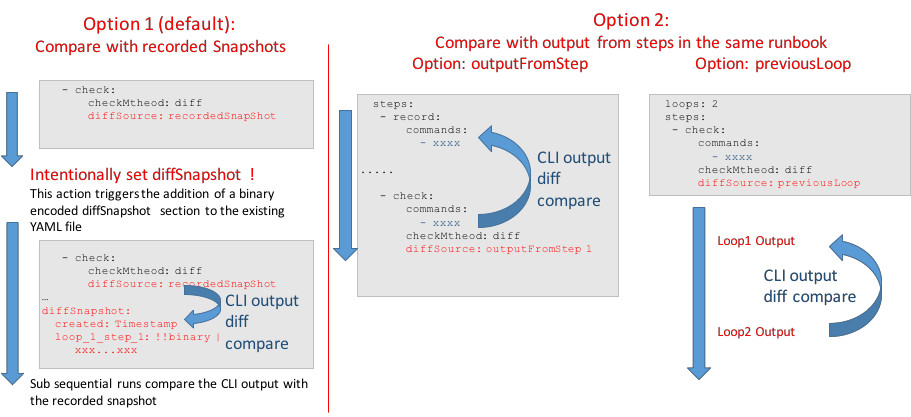
Note
relative diffChecks to steps and loops will be added in future.
diffSnapshot
setting the diffSnapshot requires a flag in the execSteps function and a subsequent function call:
myRunbook = aioRunbookScheduler("test.yml")
loop = asyncio.get_event_loop()
loop.run_until_complete(myRunbook.execSteps(loop,setDiffSnapshot = True))
myRunbook.writeDiffSnapshotToFile()
diffSnapshot is the default diff source, diffSource attribute can be omitted in this case
config:
  steps:
    - check:
        name: record test local-shell
        method: local-shell
        device: local-shell
        vendor: local-shell
        commands:
          - 'pip3 freeze | tail -n 3'
        checkMethod: diff
diffSnapshot:
  created: '2018-02-18 11:45:48.086652'
  loop_1_step_1:
  - pysnmp==4.4.4
  - PyYAML==3.12
  - yarl==1.1.0
outputFromStep
config:
  steps:
    - record:
        name: record test local-shell
        method: local-shell
        commands:
          - 'pip3 freeze'
    - check:
        name: comapre againt previous step
        method: local-shell
        commands:
          - 'pip3 freeze'
        checkMethod: diff
        diffSource: outputFromStep 1
previousLoop
config:
  loops: 2
  steps:
    - check:
        name: check previous step
        method: local-shell
        commands:
          - 'pip3 freeze'
        checkMethod: diff
        diffSource: previousLoop
diffTextFSMFilter
To filter important lines and exclude dynamic lines (timers, counters … ) the text output can be filtered by use of an textFSM filter. This is a white-list mechanism.
The diffTextFSMFilter can be applied to all three diffSources: diffSnapshot, outputFromStep and previousLoop
the example below filters pip3 packages which have the character “y” in the name.
config:
  steps:
    - check:
        name: record test local-shell
        method: local-shell
        device: local-shell
        vendor: local-shell
        commands:
          - 'pip3 freeze | tail -n 3'
        checkMethod: diff
        diffTextFSMFilter: |
          Value P0 (.*y.*)

          Start
            ^${P0} -> Record

          End
diffSnapshot:
  created: '2018-02-18 11:45:48.086652'
  loop_1_step_1:
  - PyYAML==3.12
  - yarl==1.1.0
postProcessing
aioPdfRender
This class provides the functionality to write the test results to PDF, by using Latex/Jinja2 templates. It is the responsibility of the users to create customized templates and the to use the the Jinja2 Variables to gather the results of the runbook execution. An example is found in the tests folder.
myRunbook = aioRunbookScheduler("test.yml")
loop = asyncio.get_event_loop()
loop.run_until_complete(myRunbook.execSteps(loop))

threadExecutor = concurrent.futures.ThreadPoolExecutor(max_workers=3,)
myAioPdfRender = aioPdfRender(myRunbook.configDict,{},True)
loop.run_until_complete( myAioPdfRender.writePdfFile(threadExecutor))